


What Goes Into a Digital Signage Installation, Start to Finish
A digital signage installation looks simple from the customer's side: a screen on the wall showing rotating content. From the integrator's side, it's three separate systems working together, a display, a media player, and content management software, plus the mounting and cabling to make it disappear into the wall. Get any one of the three wrong and the whole installation feels unreliable. Here's how the pieces fit together and what to plan for on your next job.
SoundPro's integration specialists can help you spec displays, players, and mounts for the job.
The Three Systems Behind Every Signage Install
- The display. A commercial-grade panel built to run 16, 18, or 24 hours a day without the burn-in and early failure a consumer TV would suffer under that duty cycle.
- The media player. A small dedicated box that stores and plays back content, independent of the display, so content updates don't require touching the screen itself.
- The content management software. What lets the customer (or you, managing it for them) push new content, schedule playlists, and monitor whether every screen in the building is actually online.
"Customers think they're buying a screen. What they're actually buying is a system that needs to keep running unattended for years. The display is the easy part. The player and the content plan are what make or break the install six months later."
Choosing the Display
The single biggest mistake in signage installs is specifying a consumer television instead of a commercial display. Commercial panels are built for continuous operation, run brighter for well-lit spaces, and include mounting points and ventilation designed for landscape or portrait wall-mount use, none of which a consumer TV is built for.

A commercial-grade 4K panel built for extended daily runtime, a common default choice for lobbies, hallways, and retail signage where the display needs to run reliably all day, every day, without the lifespan concerns of consumer electronics.
Shop at SoundPro →Choosing the Media Player
The media player is what separates a static screen from a real signage system. It's what allows a customer to schedule content, push updates remotely, and run different content on different screens from one dashboard.
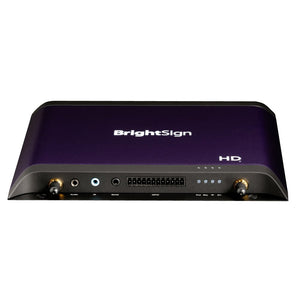
An industry-standard signage player known for reliability in unattended installs, supporting 4K playback and standard I/O for most single-screen and small multi-screen jobs. A dependable default when a client hasn't specified a particular content management platform.
Shop at SoundPro →Browse the full BrightSign lineup at SoundPro for players scaled from single displays up to multi-output video walls.
Mounting and Cable Management
A signage install that looks clean is as much about what you don't see as what you do. A proper fixed or tilt mount rated for the display's exact size and weight keeps the install secure and code-compliant, and routing power and data through the wall rather than along the surface is what separates a professional install from a DIY one.
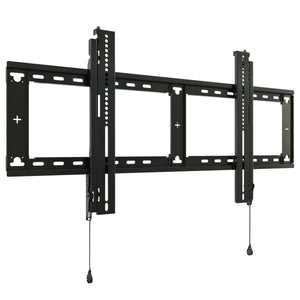
A low-profile fixed mount rated across a wide range of commercial display sizes, keeping the panel close to the wall for a clean, professional look in lobbies and hallways where depth is at a premium.
Shop at SoundPro →Signage by Use Case
| Use Case | Priority |
|---|---|
| Lobby / waiting area | Brightness and clean mounting matter more than raw player power; a single screen is usually enough |
| Retail / QSR menu boards | Frequent content updates and remote scheduling matter most; invest in the content management platform |
| House of worship lobby / overflow | Reliability and simple scheduling for weekly service info and announcements |
| Campus-wide / multi-building | Centralized content management and remote monitoring become essential at this scale |
Signage installs often happen in the same lobbies, hallways, and multipurpose rooms that also have echo or clarity problems. If a client mentions the space sounds bad along with wanting a screen installed, it's worth scoping both jobs together. Our guide to acoustic treatment covers how to diagnose and fix that at the same time.
Let's talk through screen count, content management needs, and budget.
Next Steps
If you're scoping a signage installation, here's the path we walk through with integrators:
- Confirm the use case to determine how much you need to invest in the content management platform versus the display itself.
- Spec a commercial display rated for the daily runtime the space actually requires.
- Match the media player to the content management platform the client wants, or default to a proven standard like BrightSign.
- Call SoundPro before you finalize a quote. Our integration specialists can help you avoid under-speccing the player for a job that will grow to more screens later.
- Video Displays at SoundPro
- BrightSign Digital Signage Players at SoundPro
- What Is Dante Audio? A Complete Guide for AV Integrators
- Acoustic Treatment 101
- Contact SoundPro's Integration Team
Get a custom recommendation from SoundPro's certified integration specialists.
FAQ: Digital Signage Installation
Can I use a regular TV instead of a commercial display for signage?
It's not recommended. Consumer TVs aren't built for the continuous, all-day runtime that signage requires, and are more prone to burn-in and early failure under that duty cycle. Commercial displays are purpose-built for extended daily operation and typically offer better brightness and mounting options as well.
What's the difference between the display and the media player?
The display is just the screen. The media player is a separate small device that stores and plays back content, and connects to the internet to receive scheduling and content updates. Separating the two means content can be updated remotely without touching the physical screen.
How much does a digital signage installation cost?
A single-screen installation with a commercial display, media player, and mount typically starts in the low thousands of dollars, with cost scaling based on display size, number of screens, and the content management platform chosen. SoundPro's integration specialists can provide a quote based on your specific use case.
Do I need special network access for digital signage?
Yes. Every signage media player needs reliable network connectivity to receive content updates and scheduling changes. It's important to confirm port availability and any required network permissions with the client's IT team before the installation date.
How fast can SoundPro ship digital signage equipment?
In-stock items ship same day on orders placed before 4:00 PM CST. For multi-screen or campus-wide rollouts, SoundPro's Account Managers can help sequence orders around your installation schedule.