

Pro Intercom MS300 Master Station
Pro Intercom MS300 Master Station
SoundPro Item: 59410 | Part Number: MS300
Usually ships in 5-7 business days
- Three circuits rather than the usual two.
- Circuits are linkable (A + B) or (A + B + C) with auto termination impedance adjustment.
- Each circuit’s termination can be lifted via rear panel DIP switches.
- Mic switch on each circuit can be tapped for locking or held and released for momentary.
- Full duplex, hands-free operation, in moderately noisy environments. (with optional noise-canceling gooseneck mic.)
- Front panel 4-pin XLR may be used for gooseneck mic. or headset.
- Gooseneck or headset mic. may be dynamic or electret. Lighted front panel switch sets choice.
- Front panel green LED indicates presence of 24VDC across the three circuits.
- Three front panel flashing red LEDs report trouble status of each circuit. Other circuits are not affected.
- System auto-resets when the problem is eliminated.
- While switching is all electronic, the audio paths remain analog providing comfortable long-term listening
For those who do not require all the capabilities of the MS301, Pro Intercom offers the MS300. It has all the features and qualities of the MS301, without the IFB, Paging and Auxiliary Audio functions, resulting in considerable cost savings.
Each circuit has a characteristic impedance of 200 ohms at audio frequencies, allowing many beltpacks to be connected together without significantly changing the circuit performance. The termination networks are automatically removed and inserted during circuit linking to ensure a constant impedance for all circuits. The termination networks may also be manually removed by setting a switch on the rear panel, if desired. This may be useful when using an adjunct network, or if interfacing with a larger communications system.
The internal power supply provides power for up to 66 beltpacks connected to the circuits. Power is well regulated at 24 volts DC and will automatically adjust down during periods of line voltage brownout or high loading with loudspeakers stations or other equipment. Each of the 3 circuits has its own rectifier, regulator and protective components, so a fault in one circuit does not affect the others. Short circuit protection and current limiting prevent component damage in the event of mis-connection or cable failure. The toroidal transformer, coupled with linear regulators ensure noise-free operation under all conditions. The MS300 has a quiet built-in fan that turns on automatically when needed to cool the unit. Front panel indicators show the status of all circuits and allow an operator to quickly address a circuit problem.
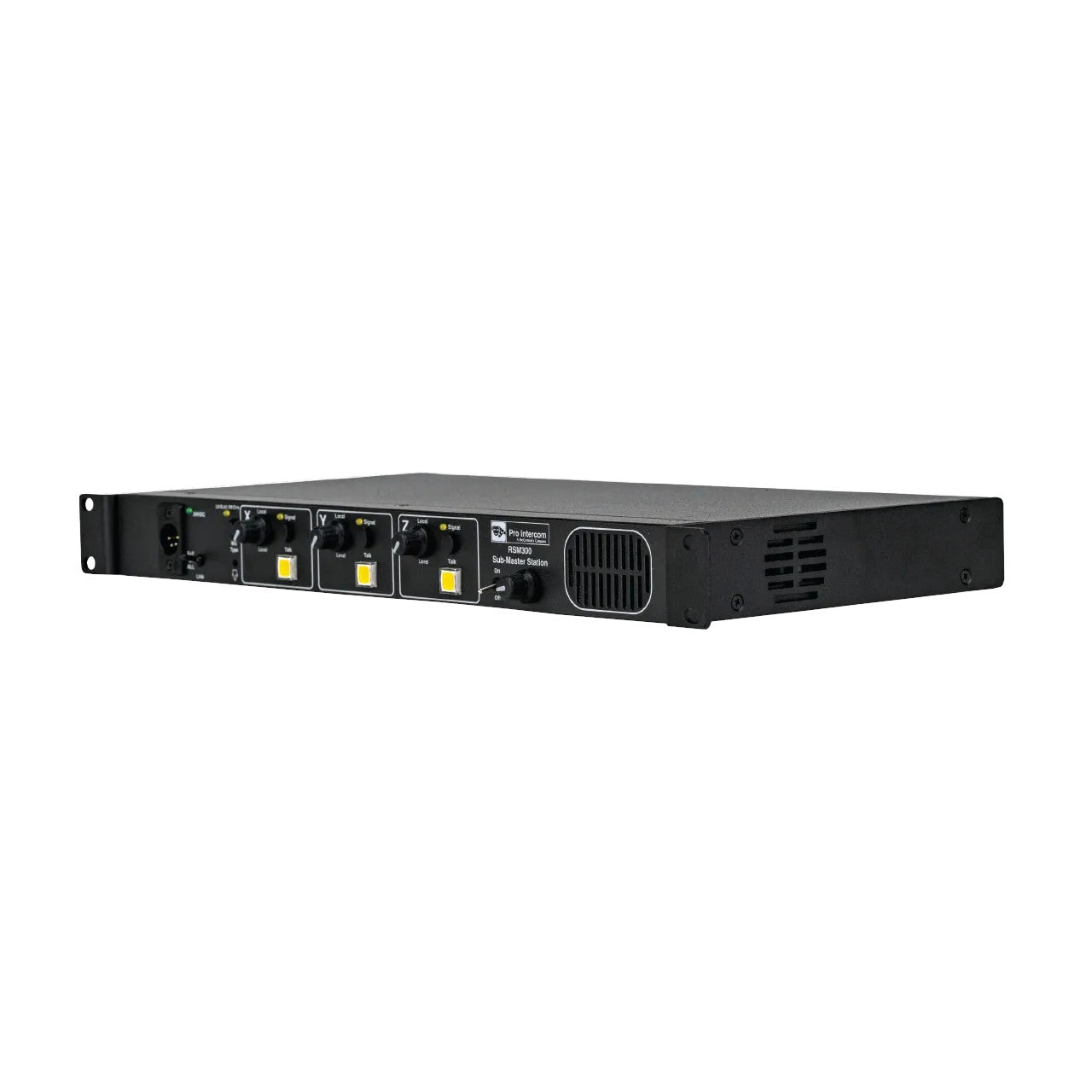
- Front Panel Controls
- 1. Main power switch: Illuminated. Indicates AC voltage present.
- 2. Headset/Handset/Gooseneck Mic input: Accepts standard dynamic or electret mic headsets/handsets/ gooseneck microphones terminated with 4pin female XLR.
- 3. Intercom circuit power indicators: Top LED indicates 24VDC present in unit. Individual channels are lit Green when in normal operating conditions. Flashing Red indicates a short circuit. Solid Red indicates overheating of power supply has occurred, and circuit has shut down.
- 4. Override activation button: Latching button sends signal to override equipped products to return them to preset volume levels. Lit LED indicates override is active.
- 5. Mic select switch: Allows user to select between dynamic or electret mic input into Headset / Handset input. Lit LED indicates Electret Mic setting Non Illuminated LED indicates Dynamic Mic setting..
- 6. Talk circuit volume control: Allows user to balance “local’ listen levels of each circuit individually. This control only effects levels at this station, and does not effect others on the talk circuit.
- 7. Mic control button: Controls mic operation for assigned talk circuit. Button has both momentary and latching function. Press and hold while talking, release when done talking, for momentary operation. Press quickly for latching operation. Illuminated switch indicates an active Mic in either mode of operation.
- 8. Signal Button: Used to signal or “call” other users on assigned talk circuit. Non latching button illuminates signal LEDs both locally and remotely. When sending or receiving a signal the LED will start to flash if button is depressed for more than .25 seconds. The signal button will also trigger any Blazon strobe units to flash 6-7 times as a visual cue to users not closely monitoring their station.
- 9. Link control switch: 3 position toggle for linking intercom talk circuits. Up position combines circuit A and circuit B into a single talk circuit. Middle position allows all 3 circuits to operate Independently of each other. Down position combines all 3 circuits into one single talk circuit.
- 10. Sidetone control: Recessed rotary potentiometer used to adjust the level of the users own voice locally. This control will only effect the level locally, and will have no effect on other users in the talk circuit. May also be used as a “Nulling Pot” to help eliminate feedback when using with a gooseneck mic and speaker. The zero setting of this control is typically near the 12 o’clock position.
- 11. Built in speaker controls: A 2 position toggle for turning the built in speaker on and off. Rotary volume knob for adjusting desired speaker listen levels. These controls effect the built in speaker only, and have no effect on the user’s headset or handset.
Why Choose SoundPro?
Since 1973, SoundPro has been the trusted source for audio, video, and lighting gear. Whether you're starting your AVL journey or are a seasoned professional, we're here to help you every step of the way.
-

Certified Account Managers
Our Account Managers, with 16+ industry certifications, are ready to find your solution.
-

Personalized Pricing
We know every project is unique. Get a personalized quote anytime you need it
-

Fast Shipping & Local Pickup
In stock items ship same day if ordered by 4pm CST. Pickup offered in Irving, TX.
-

Accountability from Real People
We aim for a smooth, transparent experience by setting and sticking to clear expectations.
-

Easy Payments & Financing
We accept all major credit cards and also offer financing through our partners.


