


The Complete In-Ear Monitor Guide for 2026: Systems, Earphones, and Setup for Churches and Live Production Teams
Your worship leader can't hear themselves. Your guitarist is cranking his amp to compensate for a dead wedge mix. Your drummer is playing to a click track she can't hear clearly, and the result is a stage that's fighting itself every Sunday. If that sounds familiar, in-ear monitors are the fix. After helping hundreds of churches and live production teams across every budget make the switch, here's everything you need to know: what IEMs are, how a complete system works, which products to buy, and exactly how to set it all up.
Talk to a SoundPro specialist with 16+ industry certifications for real answers fast.
- What Are In-Ear Monitors and Why Do They Beat Wedges?
- How a Complete IEM System Works
- Choosing the Right IEM Earphones
- Best Wireless IEM Systems in 2026
- Shure PSM 300 vs Sennheiser EW IEM G4: Which Is Right for You?
- IEM Setups by Budget: Church and Live Production
- How to Set Up Your IEM System: Step-by-Step
- Common IEM Mistakes and How to Avoid Them
- Next Steps
- FAQ
What Are In-Ear Monitors and Why Do They Beat Wedges?
In-ear monitors (IEMs) are professional-grade earphones worn by musicians, vocalists, and audio engineers to hear a personal mix during a live performance. Unlike traditional floor wedge monitors (those angled speaker boxes pointed back at the stage), IEMs sit directly in the ear canal, creating a tight acoustic seal that delivers a clean, consistent mix regardless of where you're standing on stage.
The difference in day-to-day performance is dramatic. With wedges, every musician is competing for volume: the guitarist asks for more guitar, the vocalist asks for more vocals, the keyboard player can't hear the click over everyone else asking for more of themselves. Stage volume climbs, the front-of-house mix suffers, and everyone's ears take a beating. IEMs end that cycle entirely.
- Personal mixes. Every performer hears exactly what they need. The worship leader gets click and vocals up front, the drummer gets kick, bass, and click, the keys player gets the full blend they need to lock in dynamically.
- Lower stage volume. When everyone has their own mix in their ears, nobody needs to crank anything for the room. Stage volume drops dramatically, and your front-of-house engineer finally has a fighting chance to mix what the congregation actually hears.
- Hearing protection. Floor wedges regularly expose musicians to sustained levels above 100dB. Quality IEMs with good passive isolation let performers hear clearly at safe volumes, and with passive attenuation of 25 to 37dB, the loud room around them becomes manageable.
- Consistency across venues. For touring and live production teams, IEMs deliver the same mix every night regardless of the room. The acoustic behavior of your earphones doesn't change between venues; your wedge mix always does.
"The stage volume conversation changes the moment you switch to in-ears. What used to be a constant negotiation ('more me, more me, more me') becomes a non-issue. Every musician has what they need. The room gets quieter. The mix gets better. It's the single highest-impact upgrade most worship teams can make."
How a Complete IEM System Works
Understanding the signal chain is the key to buying the right components and setting the system up correctly. A complete IEM system has four parts, and each one matters.
1. The Monitor Mix Source
This is where the audio comes from: typically a dedicated aux send or mix bus from your digital console. Most modern digital consoles (Yamaha, Allen & Heath, Midas, DiGiCo) have multiple independent aux outputs you can configure specifically for each performer's IEM mix. The beauty of digital consoles is that each musician can receive a completely different mix without any extra hardware. If you're running an analog console or a simpler digital board, a personal mixer system like the Behringer Powerplay P16-M gives each performer direct mix control at a stage box, with no dedicated monitor engineer required. For churches still determining the broader scope of their audio infrastructure, our guide to best sound systems for churches walks through how stage monitoring fits alongside speakers, mixers, and wireless mic systems in a complete setup.
2. The Transmitter
In a wireless IEM system, the transmitter is the rack-mounted unit that takes your console's monitor mix output and broadcasts it wirelessly to the bodypack receivers worn by performers. Transmitters are stereo by default, meaning each performer gets a true left/right stereo mix, which dramatically improves the listening experience over mono wedges. For wired systems, a headphone amplifier (like the Behringer Powerplay HA8000V2) takes the console output and distributes it directly to performers' earphones via a cable: simpler to set up, but no freedom of movement.
3. The Bodypack Receiver
This is the small unit clipped to a performer's belt or in-ear cable that receives the wireless signal from the transmitter and converts it back to audio. The bodypack typically has a volume control wheel and a 3.5mm or 1/4" output that the earphones plug into. Battery life is a key consideration in a church environment; you need systems that run reliably through a 2 to 3 hour service without battery anxiety.
4. The IEM Earphones
The earphones are what actually go in your ear and deliver the mix. This is where the experience is won or lost. The earphones that ship in the box with most wireless IEM systems are a starting point: functional, but not the ceiling. Upgrading to a multi-driver professional IEM earphone makes an immediate, noticeable difference in mix clarity and listening fatigue.
Choosing the Right IEM Earphones
The earphone is the most personal decision in an IEM system, and it's also the most under-invested component in most church and live production setups. Here's how to think about the choice.
Driver types explained
Dynamic drivers are the same moving-coil technology used in loudspeakers, miniaturized into an earphone. They handle low frequencies well and tend to have a warmer, more natural sound: great for drummers and bass players who need to feel the low end of a mix. Balanced armature (BA) drivers are more compact and efficient and deliver excellent midrange clarity and detail. Multi-driver IEMs combine both technologies, using multiple BAs for mids and highs and a dynamic for lows. The result is exceptional frequency separation across the entire range.
Fit and isolation
A proper acoustic seal is not optional; it's the foundation of the entire IEM experience. Poor fit means sound leaks in (raising the volume you need to hear your mix, increasing exposure) and sound leaks out (picking up stage bleed in recording situations). The included silicone ear tips in most IEM systems are fine for testing. Foam tips typically provide 5 to 8dB more isolation and are worth using for every performance. Custom-molded IEMs, made from an audiologist's impression of your ear canal, provide the best possible seal and are the standard choice for working touring professionals.
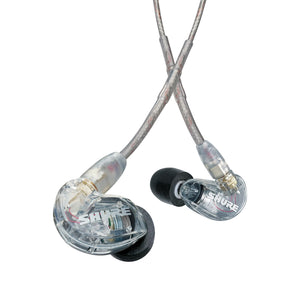
The SE215 Pro is the baseline professional IEM earphone for worship teams and live production. Single dynamic driver, up to 37dB of passive noise isolation, detachable MMCX cable (so a broken cable is a $20 fix, not a $100 replacement), and a secure over-ear fit that stays in place from soundcheck through the last song. Compatible with Shure wireless bodypack adapters for a direct cable-free connection to the PSM series.
Shop at SoundPro →For performers who want more (a dedicated worship leader, lead vocalist, or musical director who spends hours in IEMs every week), the Sennheiser IE 100 Pro and the Westone Audio Pro X series both represent meaningful upgrades in clarity, soundstage, and long-wear comfort. The step to a multi-driver IEM earphone is one of the highest-value upgrades any regular IEM user can make.
Best Wireless IEM Systems in 2026
The wireless IEM market has consolidated around a handful of professional platforms that have earned their reputations through reliability in demanding live environments. For church and live production use, we're focused on UHF systems with sufficient channel capacity, clean audio, and battery life that doesn't require mid-service management.
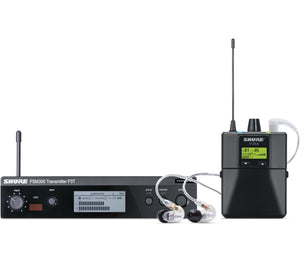
The PSM 300 is the benchmark professional wireless IEM system for worship teams and working musicians. Patented Audio Reference Companding delivers ultra-low noise and artifact-free audio: genuinely one of the cleanest-sounding wireless chains in this price tier. One-touch frequency scan and sync keeps setup simple for volunteer-run tech booths. MixMode lets performers blend two input channels into their own basic mix directly from the bodypack. Available as single-pack or twin-pack (two bodypacks, one transmitter) for pairing two performers on one channel.
Shop at SoundPro →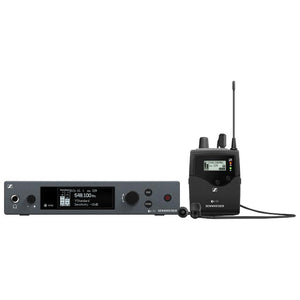
The EW IEM G4 is Sennheiser's professional workhorse IEM system, and it's been on riders and in churches worldwide for good reason. Up to 330 feet of range, up to 1,680 tunable UHF frequencies with auto-scan and infrared sync, HDX companding for transparent audio quality, and a full-metal half-rack transmitter built for real-world use. The G4 platform lets you link up to 12 bodypacks from a single transmitter for efficient multi-performer rollouts. Includes IE 4 earphones as a ready-to-use starting point.
Shop at SoundPro →SoundPro's specialists configure IEM systems for churches and live production teams every week. We'll match the right system to your console, room, and RF environment.
Shure PSM 300 vs Sennheiser EW IEM G4: Which Is Right for You?
These are the two platforms we recommend most for professional church and live production IEM use. They're comparable in price, both professionally proven, and both available from SoundPro. But they have real differences that matter for specific situations.
| Feature | Shure PSM 300 | Sennheiser EW IEM G4 |
|---|---|---|
| Audio quality | Patented Audio Reference Companding, exceptionally clean | HDX companding, transparent and natural |
| Frequency range | Varies by band; check local frequency availability | Up to 1,680 frequencies, 20 banks for maximum RF flexibility |
| Range | Up to 300 ft (line of sight) | Up to 330 ft (line of sight) |
| Multi-performer scaling | Twin pack option: 2 bodypacks per transmitter | Link up to 12 bodypacks from one transmitter via infrared sync |
| Personal mix control | MixMode blends 2 channels from the bodypack | Volume control on bodypack |
| Best for | Churches and teams that prioritize audio purity and simple setup | Larger teams, dense RF environments, touring setups |
IEM Setups by Budget: Church and Live Production
Here's how a complete IEM system configuration scales as budget grows, and where to prioritize when you can't do everything at once.
| Budget | Configuration | Best For |
|---|---|---|
| Under $800 | Wired system: headphone amp + SE215 earphones per performer, fed from console aux | Church plants, small worship bands, stationary performers (keyboardist, drummer) |
| $800 to $1,500 per channel | Shure PSM 300 or Sennheiser EW IEM G4 + included earphones | Mid-size worship teams, touring musicians, 2 to 6 performers going wireless |
| $1,500 to $2,500 per channel | PSM 300 or EW G4 + upgraded multi-driver earphones (SE425, IE 100 Pro, Westone Pro X) | Full worship bands, lead vocalists, regular performers who spend hours in IEMs |
| $5,000 to $15,000 total system | 4 to 8 channels wireless + personal mixers at stage + upgraded earphones throughout | Multi-service churches, touring rigs, venues with dedicated monitor engineer |
| $15,000 and up | Professional multi-channel wireless IEM + Shure PSM 900/1000 or Sennheiser 2000 series + custom-molded earphones + full RF coordination | Large churches, major touring productions, broadcast environments |
"The most common mistake we see is teams buying one great wireless IEM system for the worship leader and leaving everyone else on wedges. The stage volume benefit only fully kicks in when the whole team is on in-ears. Phase the rollout by role: start with vocalists, then add musicians, and commit to getting everyone over."
How to Set Up Your IEM System: Step-by-Step
Getting a wireless IEM system running isn't complicated, but the details matter, especially around RF coordination and mix configuration. Here's the process our Account Managers walk through with new installations.
Step 1: Frequency scan and assignment
Before anything else, scan your RF environment to find clean, unused frequencies. Both the Shure PSM 300 and Sennheiser EW IEM G4 have built-in auto-scan functions that identify clear frequencies in your space. Run this scan in the venue with all other wireless systems active (mics, instruments, camera links) so you get an accurate picture of what's available. Assign your IEM frequencies to clean channels and sync the bodypacks to the transmitters via infrared.
Step 2: Route your monitor mix
On most digital consoles, each performer gets their own aux send or mix bus. Label it clearly ("Worship Leader IEM," "Drummer IEM") and route it as a post-fader or pre-fader send depending on your preference. The transmitter's stereo XLR or combo inputs connect directly from the console aux output. Set the input gain on the transmitter so the signal peaks in the green without hitting the limiter.
Step 3: Build the monitor mix
This is where most new IEM users need the most guidance. The mix that works in wedges doesn't work in IEMs. In-ears are close-listening environments like headphones, so the mix needs to reflect that. Key adjustments: pull up the direct vocal level significantly (the performer's own voice), reduce ambient room reverb on the monitor bus, add gentle compression across the mix bus to handle dynamic swings, and roll off low-frequency buildup that sounds fine in a room but becomes overwhelming in earphones. Give every performer control over their relative levels and do a proper soundcheck before going live.
Step 4: Fit the earphones properly
A good acoustic seal is the difference between a system that works and one that doesn't. With over-ear cable IEMs like the SE215, route the cable over the ear before inserting the earphone. The over-ear fit locks the position and reduces cable noise. Use foam tips for maximum isolation in loud environments. Have each performer gently tug on the cable to confirm the seal is secure before soundcheck begins.
Step 5: Set bodypack volume
Start with the bodypack volume at 50% and have each performer dial to their preferred listening level. The golden rule: if you have to push the volume to maximum to hear your mix, the problem is the mix, not the volume. Go back to the console and adjust the send level rather than running the bodypack at its ceiling.
- Wireless IEM Systems at SoundPro
- Shure PSM 300 Twinpack at SoundPro
- Sennheiser EW IEM G4 at SoundPro
- Allen & Heath Digital Consoles at SoundPro
- Yamaha Digital Consoles at SoundPro
Common IEM Mistakes and How to Avoid Them
These are the problems SoundPro's specialists see most often with new IEM installations, and all of them are avoidable with the right setup approach.
- Running everyone in mono. Stereo IEM mixes are dramatically more natural and less fatiguing than mono. Most wireless IEM transmitters default to stereo. Use it. A stereo mix panned correctly (kick and bass centered, guitars panned left/right, keys wide) lets the performer hear each instrument distinctly without the whole mix competing in the same frequency space.
- Using the house mix as the monitor feed. The front-of-house mix is tuned for a room full of people at distance. In earphones at close range it sounds hyped, over-processed, and congested. Always build a dedicated monitor mix. It takes 20 minutes at soundcheck and it's the difference between musicians who love their IEMs and musicians who tolerate them.
- No ambient mic for the room. Full isolation is disorienting for performers who are used to hearing the congregation, the room, and the energy of the space. A small omnidirectional microphone at the front of the stage blended lightly into the monitor mix restores that ambient connection without compromising isolation. Many worship teams find this single addition is what makes IEMs feel genuinely comfortable rather than just technically superior.
- Ignoring RF coordination. Running IEM systems on frequencies that conflict with wireless microphones, IEM systems for other performers, or local TV broadcasts causes dropouts. Always coordinate all wireless frequencies (mics, IEMs, guitar systems) using the frequency management tools built into your wireless hardware.
- Cheap earphones on professional systems. A $1,200 wireless IEM system paired with $30 consumer earbuds is money badly spent. The earphones determine 50% of the experience. Budget realistically for earphones as part of the system cost, not as an afterthought.
- Skipping performer training. IEM monitoring requires a different mental model than wedge monitoring. Run a dedicated training session when the system is installed. Walk each performer through their mix controls, the volume wheel, the seal check, and what to do if something sounds wrong mid-service. SoundPro's Account Managers can support your team with training as part of the purchase process.
Next Steps
If you're ready to move from wedges to in-ears (or upgrade an existing IEM system that isn't performing), here's the fastest path to a system that works.
- Audit your current setup. Check your console's aux/mix bus count. If you're running a modern digital console, you may already have the routing infrastructure for a full IEM rollout. You might just need the wireless systems and earphones.
- Count your performers. How many people need IEMs? Start with the full count so your initial system design can scale cleanly rather than requiring a rebuild when you add channels later.
- Assess your RF environment. If you're running wireless microphones, guitar systems, or camera links, you need a clear picture of what frequencies are in use before specifying IEM frequencies. SoundPro's Account Managers can help you coordinate this.
- Set a realistic budget. Budget per wireless IEM channel (transmitter + bodypack + earphones) and multiply by performer count. Don't forget cabling, rackmount hardware, and if you're adding a personal mixer at the stage, that component as well.
- Call SoundPro. Our specialists spec IEM systems for churches and live production teams every week. A 20-minute conversation can save you from a $2,000 mistake and make sure every component in your system works together from day one.
Get a custom quote from SoundPro's certified specialists. We'll match the right system to your console, team size, and RF environment.
FAQ: In-Ear Monitors for Churches and Live Production
What is an in-ear monitor and how is it different from regular earbuds?
In-ear monitors (IEMs) are professional-grade earphones designed specifically for live performance monitoring. Unlike consumer earbuds, IEMs create an airtight acoustic seal in the ear canal that provides passive noise isolation of 25 to 37dB, flat frequency response optimized for monitoring accuracy, and build quality designed for nightly stage use. Professional IEMs use balanced armature or multi-driver designs engineered to deliver mix accuracy rather than the consumer-tuned sound signature of typical earbuds.
What's the best wireless IEM system for a church worship team?
For most churches, the Shure PSM 300 and Sennheiser EW IEM G4 are the two top-tier professional recommendations. The PSM 300 is the choice for teams that prioritize audio transparency and simple volunteer-friendly operation. The EW IEM G4 is the choice for larger teams, churches in dense RF environments, or teams that need to scale to many performers. The G4 supports linking up to 12 bodypacks from a single transmitter. Both are available from SoundPro's Account Managers, who can match the right system to your specific console, room, and RF environment.
How many IEM channels does a worship band need?
Each performer who needs independent mix control needs their own channel (transmitter + bodypack). A typical 5-piece worship band (worship leader, two vocalists, guitarist, keys, drummer) needs 5 to 6 channels if all are going wireless. Stationary performers like drummers and keyboardists can often run wired IEMs from a headphone amp, reducing your wireless channel count and cost. Start with your most mobile performers (worship leader, lead vocalist) and phase in additional channels from there.
Shure PSM 300 vs Sennheiser EW IEM G4: which should I buy?
Both are professional-grade systems that perform reliably in church and live production environments. The PSM 300 edges ahead on audio purity. Shure's patented Audio Reference Companding is genuinely one of the cleanest-sounding wireless chains at this price point. It's also slightly more intuitive for volunteer operators with its one-touch sync and MixMode personal blend feature. The EW IEM G4 wins on RF flexibility (up to 1,680 tunable frequencies) and multi-performer scalability. For churches in cities with congested RF environments, or teams expanding to 6 or more wireless IEM channels, the Sennheiser gives you more room to maneuver.
Do I need a personal mixer, or can I use aux sends from my console?
If your church runs a modern digital console (Yamaha CL/QL series, Allen & Heath Avantis, SQ, or dLive, Midas M32/M32R, etc.), you almost certainly have enough mix buses to feed dedicated IEM mixes per performer directly from the console without any additional hardware. A personal mixer at the stage (like the Behringer Powerplay P16-M) is the right solution when your console lacks the mix bus count, you're running an analog board, or you want performers to self-manage their own monitor levels without engineer involvement.
How do I avoid RF interference with multiple IEM systems?
RF coordination is the most important and most underestimated step in a multi-channel wireless IEM deployment. Use the auto-scan feature built into your transmitters to identify clean frequencies in your venue with all other wireless systems active. Keep IEM frequencies in a different frequency band from your wireless microphones when possible, and maintain adequate frequency separation between channels (typically 400kHz minimum). For larger systems (8 or more channels of wireless IEMs plus wireless mics), consider asking SoundPro's team to help design a coordinated frequency plan before purchase.
What earphones should I use with my wireless IEM system?
The earphones packaged with most wireless IEM systems are a workable starting point, but upgrading makes a meaningful and immediate difference. The Shure SE215 Pro is the standard professional entry point: single dynamic driver, 37dB isolation, detachable cable, proven durability. For performers who spend significant time in IEMs (worship leaders, lead vocalists), the Sennheiser IE 100 Pro or a multi-driver option from Westone Audio provides better mix clarity, improved isolation, and significantly reduced listening fatigue over long services.
Can volunteers operate a wireless IEM system?
Yes, and both the Shure PSM 300 and Sennheiser EW IEM G4 are specifically designed with simplified operation in mind. One-touch frequency scan and infrared sync reduce setup complexity dramatically. The key to volunteer-operated IEM success is a well-documented runsheet that captures the frequency assignments, bodypack volume settings, and console aux levels for each performer, so any trained volunteer can replicate the setup correctly every week. SoundPro's Account Managers can support your team with training as part of the system purchase process.
How much does a church IEM system cost?
A single-channel wireless IEM system (transmitter + one bodypack + earphones) runs $800 to $1,500 for a professional-grade setup using Shure PSM 300 or Sennheiser EW IEM G4 with quality earphones. A full worship band of 5 to 6 performers going wireless runs $5,000 to $9,000 at this tier. Wired IEM systems for stationary performers (headphone amp + earphones) cost significantly less ($150 to $400 per position) and are worth considering for your drummer and keyboardist. SoundPro's Account Managers can provide a personalized quote based on your specific team size, console, and venue.
Do I need an ambient mic with my IEM system?
An ambient mic isn't required, but it's one of the most impactful additions you can make for performers transitioning from wedges. The full acoustic isolation of a sealed IEM system removes the natural connection to the room (crowd response, the ambient energy of a live space) that musicians and worship leaders have always relied on for performance cues. A small omnidirectional microphone at the front of the stage, blended lightly into each performer's monitor mix, restores that ambient connection without compromising isolation. Many worship teams find this single addition is what makes IEMs feel genuinely comfortable rather than just technically superior.
How fast can SoundPro ship IEM systems?
In-stock items ship same day on orders placed before 4:00 PM CST. For complete multi-channel IEM system builds, personalized quotes, or items with manufacturer lead time, SoundPro's Account Managers can map out a delivery timeline and help you prioritize what ships first. If you're planning a summer installation before a fall series launch, reach out now. Wireless system components can have lead times during peak season, and building in extra time protects your install window.
What digital consoles work best with wireless IEM systems?
Any digital console with sufficient mix bus or aux send count works well with wireless IEM systems. The key specifications to confirm are the number of independent mix buses (you need one per performer's unique mix) and the number of available XLR aux outputs to connect to transmitters. Consoles our team most commonly pairs with IEM systems include the Yamaha CL and QL series, Allen & Heath SQ and Avantis, Midas M32/M32R, and DiGiCo SD series. SoundPro carries all of these console families and can help you match a console upgrade to your IEM system design simultaneously.


